LEAIC Learning Guide (R): Using the LEAIC
Overview and General Approach
In this example, we will examine homicide rates. From the FBI’s website we can find the overall U.S. homicide rate (4.5 per 100,000 persons in 2013), and we can find rates for states, counties and even some cities. Homicide rates, expressed as a number of homicides (numerator) per 100,000 persons in a geographic region (denominator), are much more informative than raw counts. However, a rate for the U.S., a state, or even a city only tells us so much. What if we wanted to examine whether homicide is predominantly a male or female phenomenon, whether homicides are more common in certain age groups, or whether there is much difference among the states? To examine this, we need population data organized by sex, age category, and state. This information is not available with UCR/NIBRS data, but it is available with Census Bureau data. We will link these sources and examine the results.
To calculate rates, we need numerators and denominators. For our numerators, we will use NIBRS data where we have selected victims of homicide. For the denominators, we will get data from the Census Bureau’s American Community Survey (ACS) by using the Census’ data table tool to create a table and export it as a comma-separated value (CSV) file. There are other sources for this data, but the Census’ data table tool is readily available. We will read the CSV file into R so that we can merge it with the NIBRS and LEAIC files.
UCR and NIBRS data are organized by law enforcement agency. Each record in a file refers to one law enforcement agency. An ORI code is an alphanumeric identifier assigned to law enforcement agencies by the FBI’s National Crime Information Center. A given law enforcement agency may have many ORI codes used for a variety of purposes. For our purpose, we are interested only in the ORI code associated with reporting crime information. In the UCR summary-reporting system the ORI code is a seven-character field. In NIBRS it is a nine-character field. The LEAIC file, which is also organized by law enforcement agency, contains both.
What you will need
We will collect the data together during this guide so you do not need to download it now.
Data
- National Incident-Based Reporting System Extract Files, 2013 – Victim-Level File
- Law Enforcement Agency Identifiers Crosswalk, 2012
- Demographic data from the Census’ data table tool
Software
- R
- RStudio
In this learning guide, our general approach is:
- Create a numerator file
- Match NIBRS homicide victim records, which contain law enforcement agency information, to LEAIC records
- Aggregate the matched file to the desired geography
- Create a denominator file
- Use the Census’ data table tool to create a table with the necessary information aggregated to the desired geography
- Merge the NIBRS-LEAIC file with the table from the Census
- Calculate rates
- Examine results
Example Task: Calculating Homicide Victimization Rates
We will use the NIBRS Extract Files for 2013. This file is located on the National Archive of Criminal Justice Data website, meaning that you will need an account to be able to download this data. Accounts are free and you can register for one on the ICPSR website. The NIBRS file is ICPSR study #36121, and we want the DS2 Victim-Level File (data set number 2 – Victim-Level Extract File). On this study’s homepage, there are a number of datasets available to download within the Data & Documentation tab. Since we are going to load this file into R using an SPSS Setup file, click ASCII + SPSS Setup in the DS2: Victim-Level File download area. Read and agree to the Terms of Use to begin the download. The download should contain a zip file called ICPSR_36121-V2.zip which has a number of folders and files inside it. Because this file is zipped, you may need software designed to open compressed, or zipped, files. ICPSR has a guide on how to handle zipped files. Within ICPSR_36121-V2.zip there is a folder called ICPSR_36121. Within that, the key folder is “DS0002” which contains the setup file (36121-0002-Setup.sps) and the data file (36121-0002-Data.txt).
Note: In this walkthrough, we will provide R code on a step-by-step basis. The full code is available here.
Select NIBRS Variables
The NIBRS files are large. This one is approximately 5.5 gigabytes. We do not need all the information included in it, so we’ll just keep the variables we need. Referring to the codebook helps identify what variables are needed.
ORI ORIGINATING AGENCY IDENTIFIER

BH007 CITY NAME

BH019 CURRENT POPULATION 1

BH023 CURRENT POPULATION 2

BH027 CURRENT POPULATION 3

BH031 CURRENT POPULATION 4

BH035 CURRENT POPULATION 5

V4007 UCR OFFENSE CODE 1

V4008 UCR OFFENSE CODE 2

V4009 UCR OFFENSE CODE 3

V4010 UCR OFFENSE CODE 4

V4011 UCR OFFENSE CODE 5

V4012 UCR OFFENSE CODE 6

V4013 UCR OFFENSE CODE 7

V4014 UCR OFFENSE CODE 8

V4015 UCR OFFENSE CODE 9

V4016 UCR OFFENSE CODE 10

V4018 AGE OF VICTIM

V4019 SEX OF VICTIM
ORI is necessary to link to the LEAIC.
BH007 - CITY NAME, while technically not necessary, is a useful descriptive variable. It will also be useful to verify that we merged this data with the LEAIC data correctly.
Variables BH019, BH023, BH027, BH031, and BH035 are five population variables. NIBRS recognizes that some cities may span more than one county. The five CURRENT POPULATION variables record the portion of the city population that is in each county. The vast majority of cities have all of their population in one county. However, there are a few hundred that have populations in multiple counties. There is no one total population variable in NIBRS. We’ll create that later.
NIBRS records up to 10 offenses per victim. The vast majority of victims experience one offense. However, to be complete we need to look at all possible offense variables. Variables V4007 to V4016 record the offenses that the victim experienced. As an aside, for single-victim crime incidents, what is recorded in variables V4007 to V4016 will be the same as what is recorded on the NIBRS offense records. For multiple-victim crime incidents, what is recorded in V4007 to V4016 is specific to an individual victim.
V4018 - AGE OF VICTIM and V4019 - SEX OF VICTIM are the demographic variables we are interested in.
You will notice that we did not choose a state variable. That may seem odd given we intend to aggregate to state level. We did not bother with a state variable at this point because we will pick up the state when we merge these data with the LEAIC.
Get Numerator Data
Below is the R code to read in the NIBRS Victim Extract File. Before you run any code, you need to set your working directory. Setting a working directory will tell R exactly where to look for the files you will use. It is good practice to place all the files you need in one folder to keep the project organized. Throughout the course of this guide we assume that you will place each of the files you need inside of that folder. To set a working directory in RStudio, click Session -> Set Working Directory -> Choose Directory. This will open a window where you can navigate to the folder containing your files. After you’ve done that, click Open, and your working directory is set.
Throughout this guide, we also assume that you are running RStudio (a “shell” of R that makes R much easier to use) and that you run this code in the script window rather than a console. A full introduction to R is beyond the scope of this guide. For an excellent introductory guide to R, which covers everything necessary in this guide and more, see here (pdf).
# Read the NIBRS 2013 Victim Extract File.
# This file is large ~ 5.5 gigs.
# Reduce the file by selecting only the variables that are needed.
# Referring to the codebook helps identify what is necessary.

# The package "asciiSetupReader" is used to read the NIBRS file.

install.packages("asciiSetupReader")

library(asciiSetupReader)

# Set working directory
# If you DID NOT change your working directory
# through the menu (as described above), delete the # at
# the start of the next line and change the value in the
# quotation marks to the path to your working directory.
# setwd("WORKING DIRECTORY PATH")

# Read in the data
# The 'keep_columns' parameter means we only
# read in the columns we need. Since this file
# is very large, this will save time and
# computer processing power.
da36121.0002 <- spss_ascii_reader(dataset_name = "36121-0002-Data.txt",
                                  sps_name = "36121-0002-Setup.sps",
                                  keep_columns = c("ORI",
                                                   "BH007", "BH019", "BH023", "BH027",
                                                   "BH031", "BH035", "V4007", "V4008",
                                                   "V4009", "V4010", "V4011", "V4012",
                                                   "V4013", "V4014", "V4015", "V4016",
                                                   "V4018", "V4019"),
                                  value_label_fix = FALSE,
                                  real_names = FALSE)
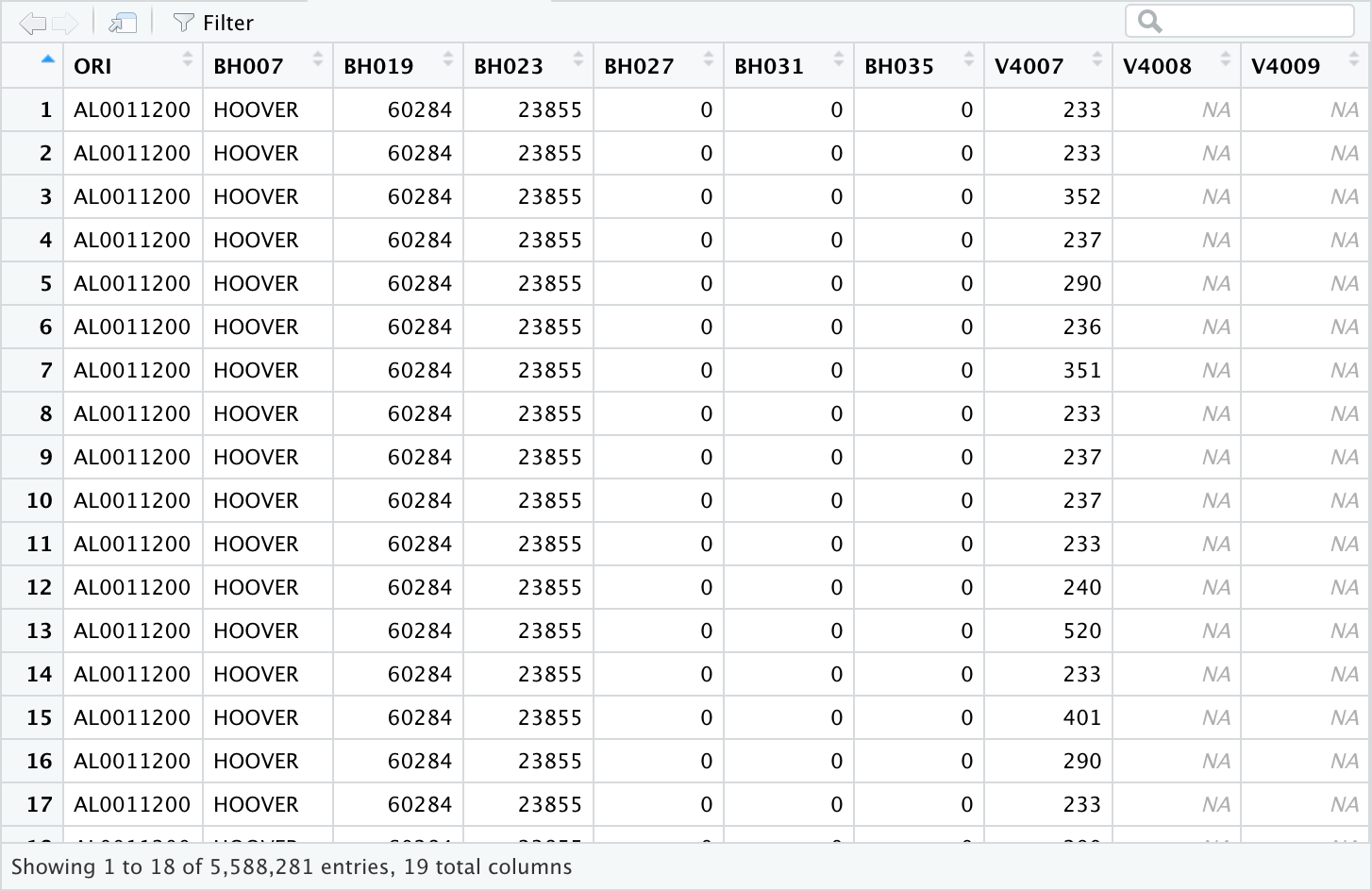
After running the above code, we have a file with 5,588,281 records – a record for each victim of crime in the NIBRS data. This includes all crimes covered in NIBRS. Homicide is relatively rare, so we can greatly reduce the file by selecting just victims of homicide. The NIBRS data indicates which crime occurred by a code rather than the name of the crime (for a complete list of which codes correspond to which crimes, please see the codebook). The code for ‘homicide’ is ’91’. Remember that each victim may have up to 10 offenses recorded, so we will need to check all 10 of these offenses for homicide. It is convenient to create a flag variable to indicate that the record is one we are interested in.
# Further reduce the file size by selecting only the offense(s) that
# we are interested in.

# Create a variable to indicate if the offense of interest is
# recorded.
# Essentially, we are making a binary variable (0 or 1) to indicate if that
# victim was murdered (1 = murdered).

# Make the new variable and give it the value of zero.
# This will make all rows 0.
# Next, we will change that row to 1 if the victim was murdered.

da36121.0002$OFFENSE <- 0

# Consider all 10 UCR OFFENSE CODE variables to see if murder is
# in any of them
da36121.0002$OFFENSE[which(da36121.0002$V4007 == 91 |
                             da36121.0002$V4008 == 91 |
                             da36121.0002$V4009 == 91 |
                             da36121.0002$V4010 == 91 |
                             da36121.0002$V4011 == 91 |
                             da36121.0002$V4012 == 91 |
                             da36121.0002$V4013 == 91 |
                             da36121.0002$V4014 == 91 |
                             da36121.0002$V4015 == 91 |
                             da36121.0002$V4015 == 91)] <- 1

# We can sum the OFFENSE column to see how many murders there are in the data
sum(da36121.0002$OFFENSE)

# Now select only victim records that had the offense of interest.
da36121.0002 <- da36121.0002[which(da36121.0002$OFFENSE == 1),]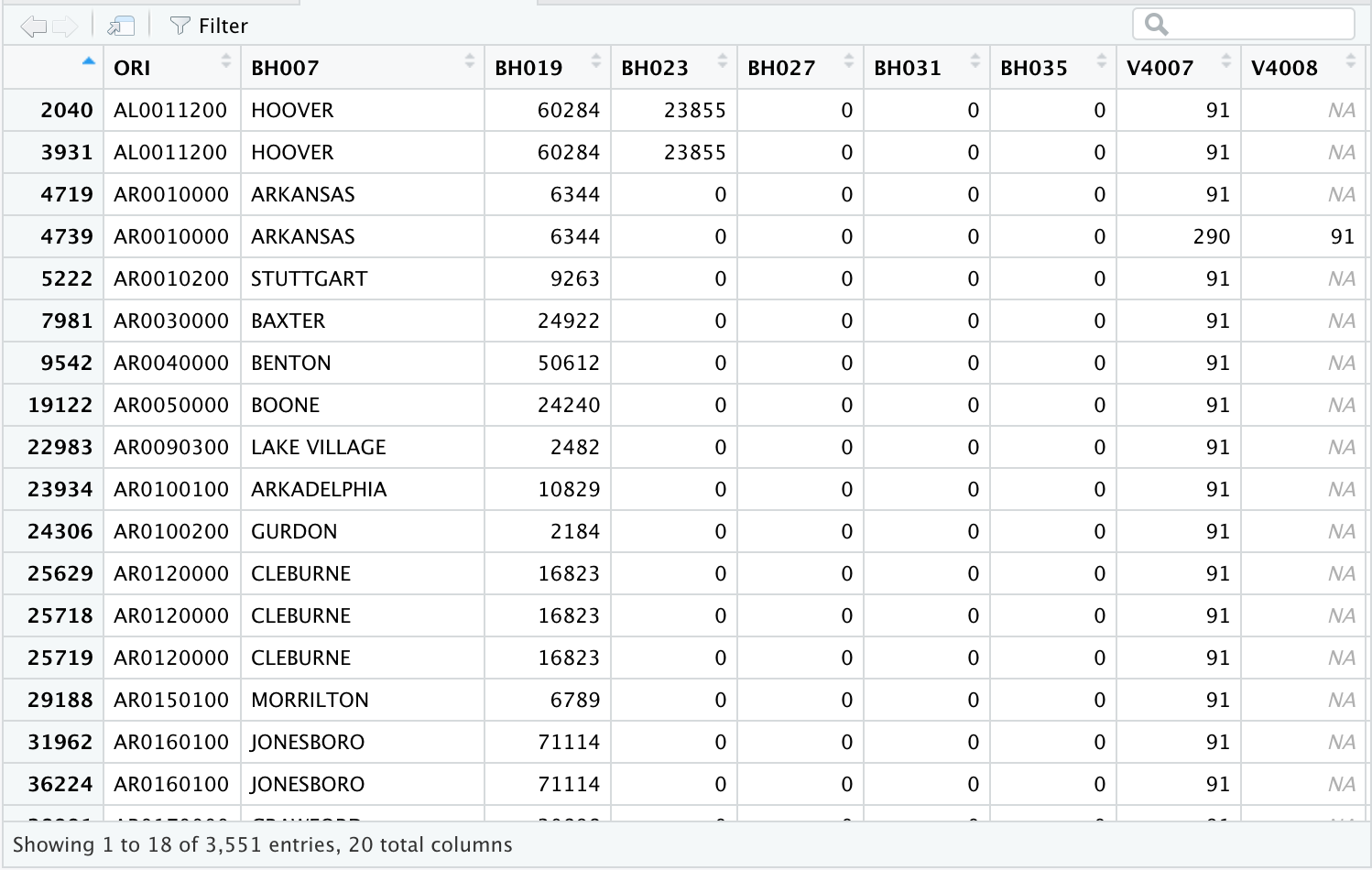
We find that there are 3,551 victims of homicide in the NIBRS data. In the bottom-left of the above screenshot we can see that our data set has only 3,551 rows of data. As each row indicates a single incident, this corresponds to 3,551 homicide victims. Remember, NIBRS does not include all of the United States, so this is just homicide victims recorded in NIBRS. If you look in the data editor you will see that each record has a code of 91 in one of the variables V4007 through V4016.
Now let’s create a total population variable. For our state-level analysis, that is all we need.
# Create a total population variable
# There are five variables with population information so we will have to sum
# them all up to get the total population for each police agency
da36121.0002$TOTPOP <- da36121.0002$BH019 + da36121.0002$BH023 +
  da36121.0002$BH027 + da36121.0002$BH031 +
  da36121.0002$BH035
At this point we have a lot of variables that we do not need. Let’s sort the data by ORI and save a victim subset file keeping fewer variables.
# Keep only the relevant variables and save this smaller file
victim_subset <- da36121.0002[, c("ORI",
                                  "BH007",
                                  "V4018",
                                  "V4019",
                                  "TOTPOP",
                                  "OFFENSE")]
save(victim_subset, file = "victim_subset.rda")
We now have a much smaller file than we started with. It’s much easier to work with and contains only what we are interested in. We sorted by ORI because that is what we will use to merge with the LEAIC. As you look at the individual records using the data editor notice that TOTPOP is repeated on each record having the same ORI code.
Get LEAIC Data
Now let’s get the data that we need from the LEAIC file. The LEAIC file is available to download in R format from the study’s homepage, ICPSR study #35158. Under the Data & Documentation tab, click the button under Download and select R. Agree to the Terms of Use and the file will begin to download. This file is an .rda file already so we do not need to use a Setup file to read it. Clicking R will download a zipped folder called ICPSR_35158-V2.zip which contains a folder called ICPSR_35158. Within this folder is yet another folder called DS0001 which contains the file we want, 35158-0001-Data.rda (remember to move this file to your working directory).
We need the LEAIC file because the geography codes in the FBI’s UCR/NIBRS data are not the same as the codes used by the Census Bureau. The LEAIC has both sets of geography codes for each law enforcement agency. As with the NIBRS data, we don’t need all of the LEAIC variables or cases, so we’ll keep just what we need.
FSTATE FIPS STATE CODE

ORI9   ORIGINATING AGENCY IDENTIFIER (9 CHARACTERS)

NAME   AGENCY NAME
FSTATE contains information on which state each agency is in. We will use this first to only select states where every agency reports to NIBRS and aggregate the crimes by state. Then we will use it to merge with the Census file. ORI9 is a nine-character long alphanumeric identifier that the FBI uses to identify each agency. Because NIBRS has an identical column, we will use it to merge the two data sets. NAME is the name of the agency and can be used to check that the crosswalk merged with the NIBRS file correctly. If the name of the agency is the same in NAME and BH007 (NIBRS column for the city name), we can be confident the merge was successful.
# Read the LEAIC file
load (file="35158-0001-Data.rda")
# Keep only the variables we are interested in.
# Just the variables referring to FIPS state, FIPS place, ORI,
# law enforcement agency name, and total population
da35158.0001 <- da35158.0001[, c("FSTATE",
                                 "FPLACE",
                                 "ORI9",
                                 "NAME",
                                 "U_TPOP")]

# Select only records that have a valid value for the ORI9 code.
# This is important because after selection we will have a file
# with unique values for the ORIGINATING AGENCY IDENTIFIER.
# Then save this subset
leaic_subset <- da35158.0001[which(da35158.0001$ORI9 != "-1"),]
save(leaic_subset, file = "leaic_subset.rda")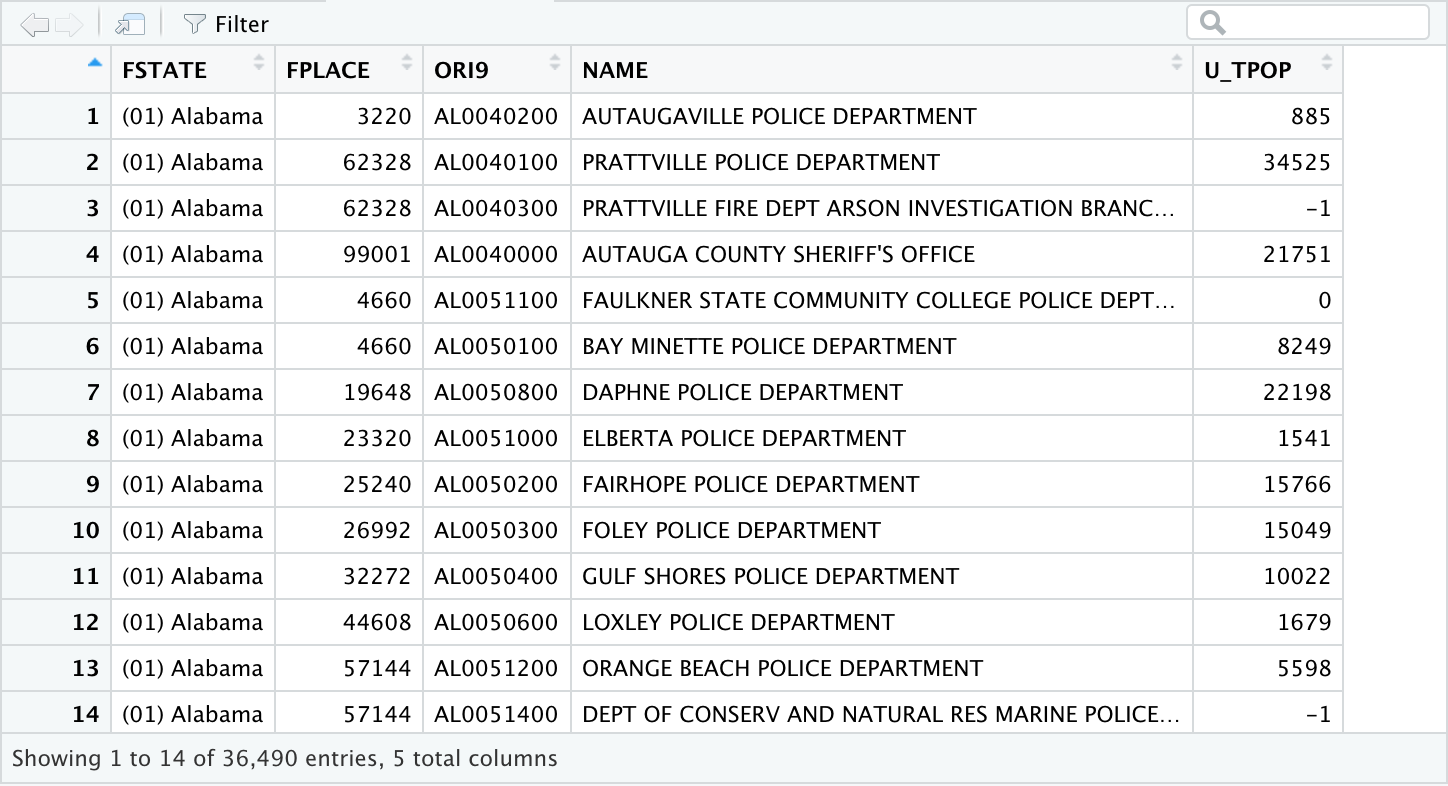
Merge NIBRS with LEAIC
Now it is time to merge our two subset files together. We merge the files using the ORI variable. In the NIBRS data the variable is simply named ORI. In the LEAIC file there are two ORI variables: a 7-character version and a 9-character version. We have to rename ORI in the NIBRS data to be compatible with the LEAIC. Our merged file will have all the records and variables from the victim subset file, and when there is a match on ORI9 with the LEAIC, that data will be included. We run a cross tabulation to get a summary of homicides by state.
# Change the column name in victim_subset to be the same as in
# leaic_subset
names(victim_subset)[1] <- "ORI9"
# Merge the two subset files together.
nl_subset <- merge(victim_subset, leaic_subset,
                    by = "ORI9", all.x = TRUE)

# Run a crosstabulation to see what we have -
# FIPS STATE CODE BY SEX OF VICTIM.
table(nl_subset$FSTATE, nl_subset$V4019, useNA=?ifany?) 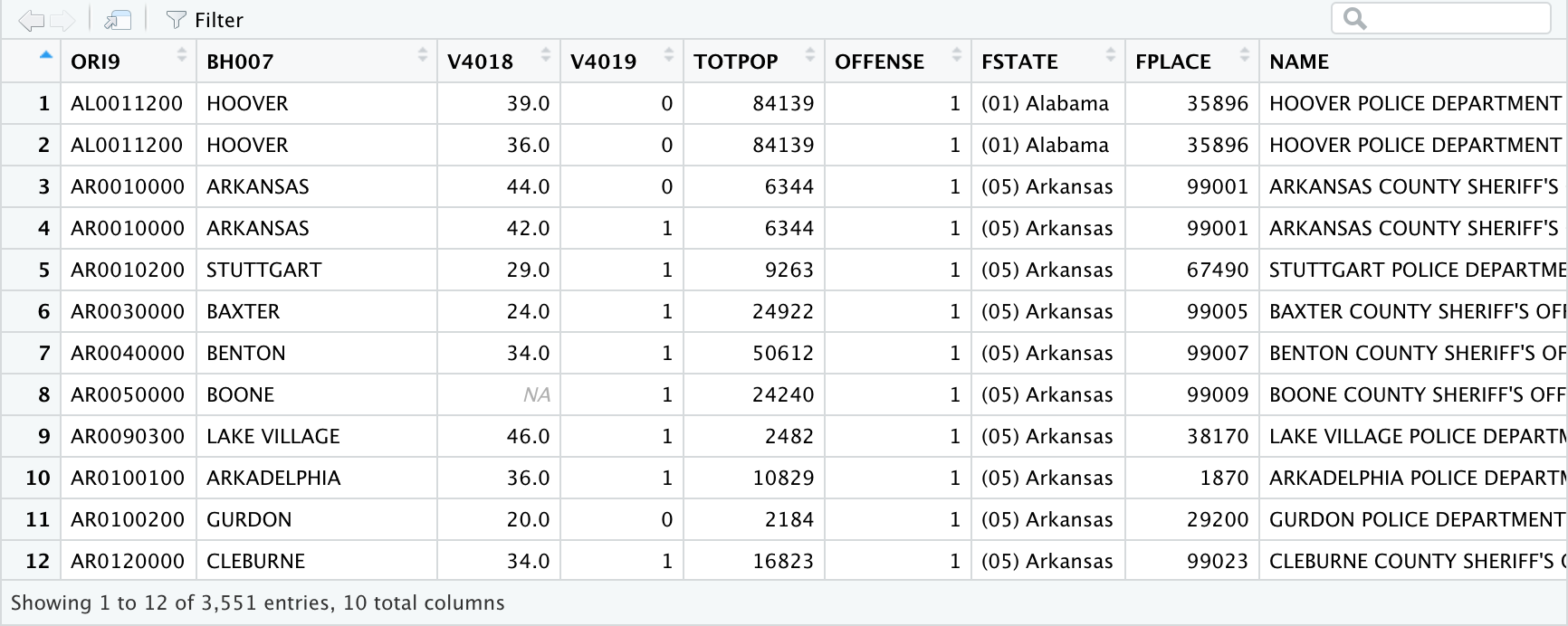
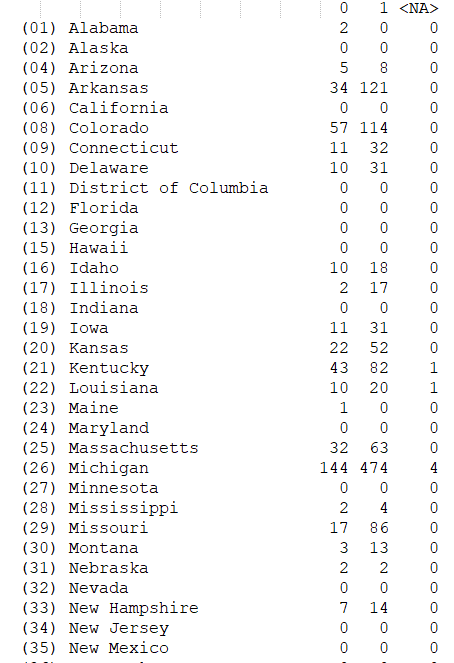
When we look at the cross tabulation output, we notice a few things: Data are not perfect. Remember that not all states participate in NIBRS, and of the ones that do, not all law enforcement agencies are included. However, some states, such as Michigan, are 100% NIBRS. There are also some missing data; the sex of the victim is unknown for 14 victims (NA = “unknown”).
Looking at the individual records in the data editor we see what appears to be duplicate information. The names of the law enforcement agency and the populations are listed twice. For all the previous talk about keeping only what is necessary, why include this information twice? The reason is to help verify that the merge was done correctly. If we saw that variable BH007 (from NIBRS) contains DETROIT, but variable NAME (from LEAIC) contains ANN ARBOR, then something is wrong. This is simply a check to make sure that the merge worked correctly. If the names are the same, we can be confident our merge was successful. Visually inspecting the data shows us that the merge worked as expected. The population variable TOTPOP (from NIBRS) differs from the variable U_TPOP (from LEAIC) in most cases. This is because our NIBRS data is from 2013 while the LEAIC is from 2012. We will use population data from the Census, so don’t worry about this.
# Save a copy of our file (nl -> NIBRS-LEAIC)
save(nl_subset, file = "nl_subset.rda")
Calculate Numerators
The file that we just saved has all we need to calculate the numerator portion of our homicide rates. We need to create state totals from the individual law enforcement records that we currently have. The first thing we need to do is make age category variables.
The NIBRS victim data includes the sex and actual age (in years) of the victims. We could calculate a victimization rate for every age, but people usually find rates for specific important ages and age categories more useful. We also need to be aware that our denominator data may not be in the same form as the numerator data. For instance, the ACS data we will get from the Census’ data table tool are not in the same form as the NIBRS data. Most age groups are categorized into 5-year categories (25-29, 30-34, etc.), but finer categories are used for ages 15-24, as those are the prime ages of criminal offending. The youngest and the oldest categories are grouped as ‘under 5 years’ and ’85 years and older’, respectively. We’ll make our numerator data – sex and victim age categories – match the denominator data from the ACS.
The ACS age categories are as follows:
| Under 5 years |
| 5 to 9 years |
| 10 to 14 years |
| 15 to 19 years |
| 20 to 24 years |
| 25 to 29 years |
| 30 to 34 years |
| 35 to 39 years |
| 40 to 44 years |
| 45 to 49 years |
| 50 to 54 years |
| 55 to 59 years |
| 60 to 64 years |
| 65 to 69 years |
| 70 to 74 years |
| 75 to 79 years |
| 80 to 84 years |
| 85 years and older |
In an ideal world, all the data we need would be available in the format we want it. Unfortunately, we often have to use data that was created for other purposes than our research, and thus comes with certain limitations. The American Community Survey limits their age data to the above categories; therefore, we too are limited in the ages we can look at. Though the NIBRS data we are using is specific enough to tell if a victim is under one week old, the data from American Fact Finder specifies only years, and in many cases only groups of years. When working with multiple data sets, we can only be as specific as the least specific data set is. The Census data from American Fact Finder are less specific than NIBRS, so we must be less specific as well. The LEAIC allows researchers to use multiple data sets during their research. What research can be done, however, is still limited by the data available
The ACS data has 18 age categories for both females and males. The code below creates and labels 36 variables.
# Create SEX-AGE categories.
# V4018 (age), and V4019 (sex) of victim respectively.
# The compute statements will create a value only if BOTH
# V4018 and V4019 have valid values.

# Create new columns with a temporary value of 0.
nl_subset$F_LT5   <- 0
nl_subset$F5_9    <- 0
nl_subset$F10_14  <- 0
nl_subset$F15_19  <- 0
nl_subset$F20_24  <- 0
nl_subset$F25_29  <- 0
nl_subset$F30_34  <- 0
nl_subset$F35_39  <- 0
nl_subset$F40_44  <- 0
nl_subset$F45_49  <- 0
nl_subset$F50_54  <- 0
nl_subset$F55_59  <- 0
nl_subset$F60_64  <- 0
nl_subset$F65_69  <- 0
nl_subset$F70_74  <- 0
nl_subset$F75_79  <- 0
nl_subset$F80_84  <- 0
nl_subset$F85_OVR <- 0


# If the conditions are satisfied, the column gets a value of 1.
nl_subset$F_LT5[which(nl_subset$V4019 == 0
                      & nl_subset$V4018 >= 0
                      & nl_subset$V4018 <= 4)] <- 1
nl_subset$F5_9[which(nl_subset$V4019 == 0
                     & nl_subset$V4018 >= 5
                     & nl_subset$V4018 <= 9)]<- 1
nl_subset$F10_14[which(nl_subset$V4019 == 0
                       & nl_subset$V4018 >= 10
                       & nl_subset$V4018 <= 14)] <- 1
nl_subset$F15_19[which(nl_subset$V4019 == 0
                       & nl_subset$V4018 >= 15
                       & nl_subset$V4018 <= 19)] <- 1
nl_subset$F20_24[which(nl_subset$V4019 == 0
                       & nl_subset$V4018 >= 20
                       & nl_subset$V4018 <= 24)]  <- 1
nl_subset$F25_29[which(nl_subset$V4019 == 0
                       & nl_subset$V4018 >= 25
                       & nl_subset$V4018 <= 29)] <- 1
nl_subset$F30_34[which(nl_subset$V4019 == 0
                       & nl_subset$V4018 >= 30
                       & nl_subset$V4018 <= 34)] <- 1
nl_subset$F35_39[which(nl_subset$V4019 == 0
                       & nl_subset$V4018 >= 35
                       & nl_subset$V4018 <= 39)] <- 1
nl_subset$F40_44[which(nl_subset$V4019 == 0
                       & nl_subset$V4018 >= 40
                       & nl_subset$V4018 <= 44)] <- 1
nl_subset$F45_49[which(nl_subset$V4019 == 0
                       & nl_subset$V4018 >= 45
                       & nl_subset$V4018 <= 49)] <- 1
nl_subset$F50_54[which(nl_subset$V4019 == 0
                       & nl_subset$V4018 >= 50
                       & nl_subset$V4018 <= 54)] <- 1
nl_subset$F55_59[which(nl_subset$V4019 == 0
                       & nl_subset$V4018 >= 55
                       & nl_subset$V4018 <= 59)] <- 1
nl_subset$F60_64[which(nl_subset$V4019 == 0
                       & nl_subset$V4018 >= 60
                       & nl_subset$V4018 <= 64)] <- 1
nl_subset$F65_69[which(nl_subset$V4019 == 0
                       & nl_subset$V4018 >= 65
                       & nl_subset$V4018 <= 69)] <- 1
nl_subset$F70_74[which(nl_subset$V4019 == 0
                       & nl_subset$V4018 >= 70
                       & nl_subset$V4018 <= 74)] <- 1
nl_subset$F75_79[which(nl_subset$V4019 == 0
                       & nl_subset$V4018 >= 75
                       & nl_subset$V4018 <= 79)] <- 1
nl_subset$F80_84[which(nl_subset$V4019 == 0
                       & nl_subset$V4018 >= 80
                       & nl_subset$V4018 <= 84)] <- 1
nl_subset$F85_OVR[which(nl_subset$V4019 == 0
                        & nl_subset$V4018 >= 85)] <- 1


# Let's do the same thing again but with male victims.
# The difference in this case is that V4019 is 1 instead of 0.


nl_subset$M_LT5   <- 0
nl_subset$M5_9    <- 0
nl_subset$M10_14  <- 0
nl_subset$M15_19  <- 0
nl_subset$M20_24  <- 0
nl_subset$M25_29  <- 0
nl_subset$M30_34  <- 0
nl_subset$M35_39  <- 0
nl_subset$M40_44  <- 0
nl_subset$M45_49  <- 0
nl_subset$M50_54  <- 0
nl_subset$M55_59  <- 0
nl_subset$M60_64  <- 0
nl_subset$M65_69  <- 0
nl_subset$M70_74  <- 0
nl_subset$M75_79  <- 0
nl_subset$M80_84  <- 0
nl_subset$M85_OVR <- 0


nl_subset$M_LT5[which(nl_subset$V4019 == 1
                      & nl_subset$V4018 >= 0
                      & nl_subset$V4018 <= 4)] <- 1
nl_subset$M5_9[which(nl_subset$V4019 == 1
                     & nl_subset$V4018 >= 5
                     & nl_subset$V4018 <= 9)] <- 1
nl_subset$M10_14[which(nl_subset$V4019 == 1
                       & nl_subset$V4018 >= 10
                       & nl_subset$V4018 <= 14)] <- 1
nl_subset$M15_19[which(nl_subset$V4019 == 1
                       & nl_subset$V4018 >= 15
                       & nl_subset$V4018 <= 19)] <- 1
nl_subset$M20_24[which(nl_subset$V4019 == 1
                       & nl_subset$V4018 >= 20
                       & nl_subset$V4018 <= 24)] <- 1
nl_subset$M25_29[which(nl_subset$V4019 == 1
                       & nl_subset$V4018 >= 25
                       & nl_subset$V4018 <= 29)] <- 1
nl_subset$M30_34[which(nl_subset$V4019 == 1
                       & nl_subset$V4018 >= 30
                       & nl_subset$V4018 <= 34)] <- 1
nl_subset$M35_39[which(nl_subset$V4019 == 1
                       & nl_subset$V4018 >= 35
                       & nl_subset$V4018 <= 39)] <- 1
nl_subset$M40_44[which(nl_subset$V4019 == 1
                       & nl_subset$V4018 >= 40
                       & nl_subset$V4018 <= 44)] <- 1
nl_subset$M45_49[which(nl_subset$V4019 == 1
                       & nl_subset$V4018 >= 45
                       & nl_subset$V4018 <= 49)] <- 1
nl_subset$M50_54[which(nl_subset$V4019 == 1
                       & nl_subset$V4018 >= 50
                       & nl_subset$V4018 <= 54)] <- 1
nl_subset$M55_59[which(nl_subset$V4019 == 1
                       & nl_subset$V4018 >= 55
                       & nl_subset$V4018 <= 59)] <- 1
nl_subset$M60_64[which(nl_subset$V4019 == 1
                       & nl_subset$V4018 >= 60
                       & nl_subset$V4018 <= 64)] <- 1
nl_subset$M65_69[which(nl_subset$V4019 == 1
                       & nl_subset$V4018 >= 65
                       & nl_subset$V4018 <= 69)] <- 1
nl_subset$M70_74[which(nl_subset$V4019 == 1
                       & nl_subset$V4018 >= 70
                       & nl_subset$V4018 <= 74)] <- 1
nl_subset$M75_79[which(nl_subset$V4019 == 1
                       & nl_subset$V4018 >= 75
                       & nl_subset$V4018 <= 79)] <- 1
nl_subset$M80_84[which(nl_subset$V4019 == 1
                       & nl_subset$V4018 >= 80
                       & nl_subset$V4018 <= 84)] <- 1
nl_subset$M85_OVR[which(nl_subset$V4019 == 1
                        & nl_subset$V4018 >= 85)] <- 1
That is a lot of code, but remember we are interested in taking an overall rate – the U.S. homicide victimization rate – and looking at it in finer detail. That requires extra effort. Generating a frequency table for one variable – FSTATE – is sufficient to see that our code worked without errors. Working without error messages is not the same as working correctly. The frequency on FSTATE (FIPS STATE) already starts to tell us a more interesting story about homicide victims. We see a lot of variation among the states. That is to be expected given that states vary greatly in population, and we adjust for that later. We also see some numbers that, at first, make no sense. California is not listed at all, and Illinois shows 19 homicides. Remember that NIBRS does not currently include all states; California does not participate. Also, while the State of Illinois participates, the City of Chicago does not. We will select for states that are 100% NIBRS reporting soon.
Now it’s time to aggregate our sex-age category variables to get total counts. The aggregate command creates new variables that correspond to the total homicide victims by sex-age category. We also create variables for the total female, male and overall victim counts, and make labels for these new variables. We then select only the states that are 100% NIBRS reporting, which can be found on the FBI website. Finally, we recode system missing values to zero and save a file of victim counts. That file has all we need for our numerators.
# Aggregate to state totals.
victim_counts <- aggregate(cbind(TF_LT5		= F_LT5,
                                 TF5_9    		= F5_9,
                                 TF10_14 		= F10_14,
                                 TF15_19 		= F15_19,
                                 TF20_24 		= F20_24,
                                 TF25_29  		= F25_29,
                                 TF30_34 		= F30_34,
                                 TF35_39  		= F35_39,
                                 TF40_44 		= F40_44,
                                 TF45_49 		= F45_49,
                                 TF50_54 		= F50_54,
                                 TF55_59 		= F55_59,
                                 TF60_64 		= F60_64,
                                 TF65_69 		= F65_69,
                                 TF70_74 		= F70_74,
                                 TF75_79 		= F75_79,
                                 TF80_84 		= F80_84,
                                 TF85_OVR 		= F85_OVR,
                                 TM_LT5 		= M_LT5,
                                 TM5_9 		= M5_9,
                                 TM10_14 		= M10_14,
                                 TM15_19		= M15_19,
                                 TM20_24 		= M20_24,
                                 TM25_29 		= M25_29,
                                 TM30_34 		= M30_34,
                                 TM35_39 		= M35_39,
                                 TM40_44 		= M40_44,
                                 TM45_49 		= M45_49,
                                 TM50_54 		= M50_54,
                                 TM55_59 		= M55_59,
                                 TM60_64 		= M60_64,
                                 TM65_69 		= M65_69,
                                 TM70_74 		= M70_74,
                                 TM75_79 		= M75_79,
                                 TM80_84 		= M80_84,
                                 TM85_OVR 		= M85_OVR)
                           ~ FSTATE,
                           data = nl_subset, FUN = sum)


# Compute total female victims
victim_counts$TFEMALE <-  rowSums(victim_counts[2:19])
# compute total male victims
victim_counts$TMALE    <- rowSums(victim_counts[20:37])
# Compute total victims
victim_counts$TVICTIMS <- victim_counts$TFEMALE + victim_counts$TMALE


# Add descriptive labels to these new columns.
attr(victim_counts$TF_LT5, "label") 		<- "TOTAL FEMALE VICTIM
LESS THAN 5 YEARS OLD"
attr(victim_counts$TF5_9, "label") 		<- "TOTAL FEMALE VICTIMS 5
TO 9 YEARS OLD"
attr(victim_counts$TF10_14, "label") 		<- "TOTAL FEMALE VICTIMS 10
TO 14 YEARS OLD"
attr(victim_counts$TF15_19, "label") 		<- "TOTAL FEMALE VICTIMS 15
TO 19 YEARS OLD"
attr(victim_counts$TF20_24, "label")		<- "TOTAL FEMALE VICTIMS
20 TO 24 YEARS OLD"
attr(victim_counts$TF25_29, "label")		<- "TOTAL FEMALE VICTIMS
25 TO 29 YEARS OLD"
attr(victim_counts$TF30_34, "label") 		<- "TOTAL FEMALE VICTIMS 30
TO 34 YEARS OLD"
attr(victim_counts$TF35_39, "label") 		<- "TOTAL FEMALE VICTIMS 35
TO 39 YEARS OLD"
attr(victim_counts$TF40_44, "label") 		<- "TOTAL FEMALE VICTIMS 40
TO 44 YEARS OLD"
attr(victim_counts$TF45_49, "label") 		<- "TOTAL FEMALE VICTIMS 45
TO 49 YEARS OLD"
attr(victim_counts$TF50_54, "label") 		<- "TOTAL FEMALE VICTIMS 50
TO 54 YEARS OLD"
attr(victim_counts$TF55_59, "label")		<- "TOTAL FEMALE VICTIMS
55 TO 59 YEARS OLD"
attr(victim_counts$TF60_64, "label") 		<- "TOTAL FEMALE VICTIMS 60
TO 64  YEARS OLD"
attr(victim_counts$TF65_69, "label") 		<- "TOTAL FEMALE VICTIMS 65
TO 69 YEARS OLD"
attr(victim_counts$TF70_74, "label") 		<- "TOTAL FEMALE VICTIMS 70
TO 74 YEARS OLD"
attr(victim_counts$TF75_79, "label") 		<- "TOTAL FEMALE VICTIMS 75
TO 79 YEARS OLD"
attr(victim_counts$TF80_84, "label") 		<- "FEMALE VICTIMS 80 TO 84
YEARS OLD"
attr(victim_counts$TF85_OVR, "label")		<- "TOTAL FEMALE VICTIMS
85 YEARS OLD AND OVER"
attr(victim_counts$TM_LT5, "label") 		<- "TOTAL MALE VICTIM LESS
THAN 5 YEARS OLD"
attr(victim_counts$TM5_9, "label")		<- "TOTAL MALE VICTIMS 5
TO 9 YEARS OLD"
attr(victim_counts$TM10_14, "label")		<- "TOTAL MALE VICTIMS 10
TO 14 YEARS OLD"
attr(victim_counts$TM15_19, "label") 		<- "TOTAL MALE VICTIMS 15
TO 19 YEARS OLD"
attr(victim_counts$TM20_24, "label")		<- "TOTAL MALE VICTIMS 20
TO 24 YEARS OLD"
attr(victim_counts$TM25_29, "label")		<- "TOTAL MALE VICTIMS 25
TO 29 YEARS OLD"
attr(victim_counts$TM30_34, "label") 		<- "TOTAL MALE VICTIMS 30
TO 34 YEARS OLD"
attr(victim_counts$TM35_39, "label") 		<- "TOTAL MALE VICTIMS 35
TO 39 YEARS OLD"
attr(victim_counts$TM40_44, "label")		<- "TOTAL MALE VICTIMS 40
TO 44 YEARS OLD"
attr(victim_counts$TM45_49, "label")		<- "TOTAL MALE VICTIMS 45
TO 49 YEARS OLD"
attr(victim_counts$TM50_54, "label")		<- "TOTAL MALE VICTIMS 50
TO 54 YEARS OLD"
attr(victim_counts$TM55_59, "label") 		<- "TOTAL MALE VICTIMS 55
TO 59 YEARS OLD"
attr(victim_counts$TM60_64, "label") 		<- "TOTAL MALE VICTIMS 60
TO 64 YEARS OLD"
attr(victim_counts$TM65_69, "label")		<- "TOTAL MALE VICTIMS 65
TO 69 YEARS OLD"
attr(victim_counts$TM70_74, "label")		<- "TOTAL MALE VICTIMS 70
TO 74 YEARS OLD"
attr(victim_counts$TM75_79, "label")		<- "TOTAL MALE VICTIMS 75
TO 79 YEARS OLD"
attr(victim_counts$TM80_84, "label") 		<- "TOTAL MALE VICTIMS 80
TO 84 YEARS OLD"
attr(victim_counts$TM85_OVR, "label") 		<- "TOTAL MALE VICTIMS 85
YEARS OLD AND OVER"
attr(victim_counts$TFEMALE, "label") 		<- "TOTAL FEMALE VICTIMS"
attr(victim_counts$TMALE, "label")		<- "TOTAL MALE VICTIMS"
attr(victim_counts$TVICTIMS, "label") <- "TOTAL VICTIMS" 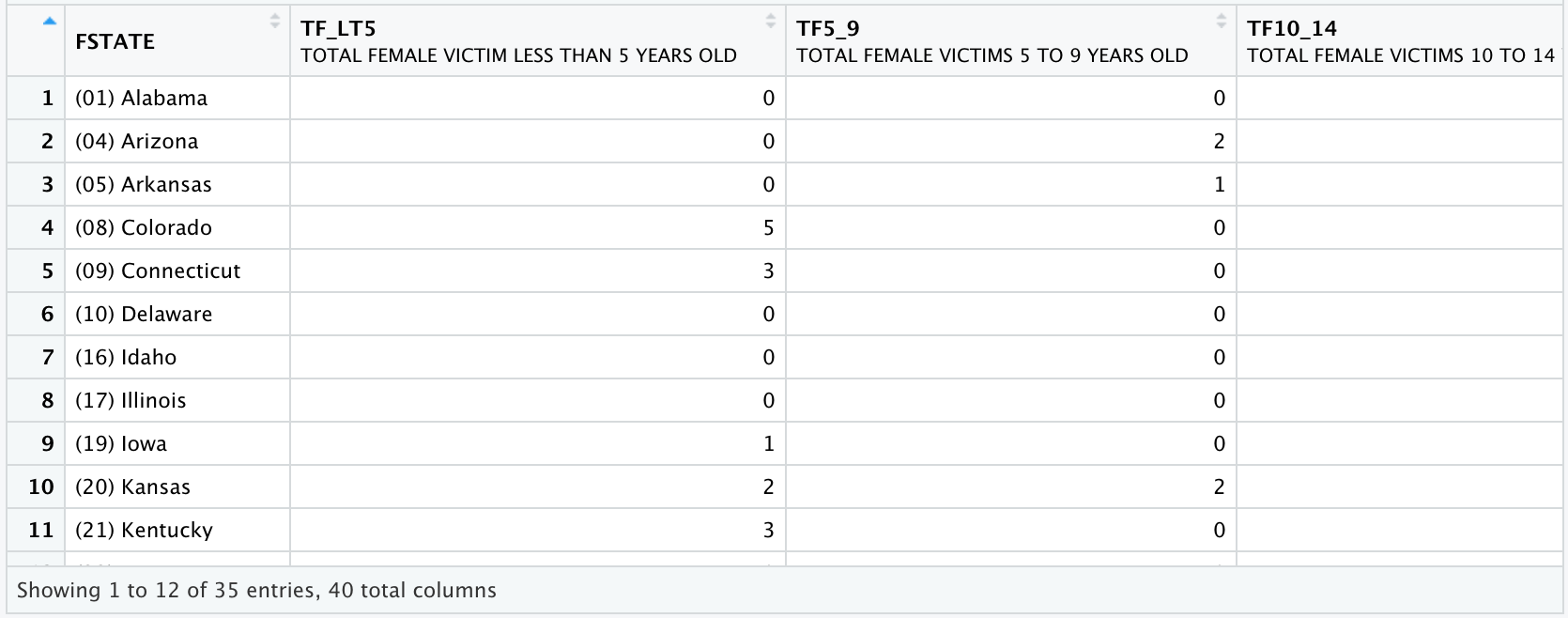
# Select rows containing only states that are 100% NIBRS.
victim_counts <- victim_counts[
                                       c(3, 4,
                                         6, 7,
                                         9, 15,
                                         18, 20,
                                         21, 26,
                                         27, 28,
                                         31, 32,
                                         34),]

# Recode FIPS (FSTATE) to numeric FIPS (FSTATE2)
victim_counts$FSTATE2 [victim_counts$FSTATE=="(05) Arkansas"] = 5
victim_counts$FSTATE2 [victim_counts$FSTATE=="(08) Colorado"] = 8
victim_counts$FSTATE2 [victim_counts$FSTATE=="(10) Delaware"] = 10
victim_counts$FSTATE2 [victim_counts$FSTATE=="(16) Idaho"] = 16
victim_counts$FSTATE2 [victim_counts$FSTATE=="(19) Iowa"] = 19
victim_counts$FSTATE2 [victim_counts$FSTATE=="(26) Michigan"] = 26
victim_counts$FSTATE2 [victim_counts$FSTATE=="(30) Montana"] = 30
victim_counts$FSTATE2 [victim_counts$FSTATE=="(33) New Hampshire"] = 33
victim_counts$FSTATE2 [victim_counts$FSTATE=="(38) North Dakota"] = 38
victim_counts$FSTATE2 [victim_counts$FSTATE=="(45) South Carolina"] = 45
victim_counts$FSTATE2 [victim_counts$FSTATE=="(46) South Dakota"] = 46
victim_counts$FSTATE2 [victim_counts$FSTATE=="(47) Tennessee"] = 47
victim_counts$FSTATE2 [victim_counts$FSTATE=="(50) Vermont"] = 50
victim_counts$FSTATE2 [victim_counts$FSTATE=="(51) Virginia"] = 51
victim_counts$FSTATE2 [victim_counts$FSTATE=="(54) West Virginia"] = 54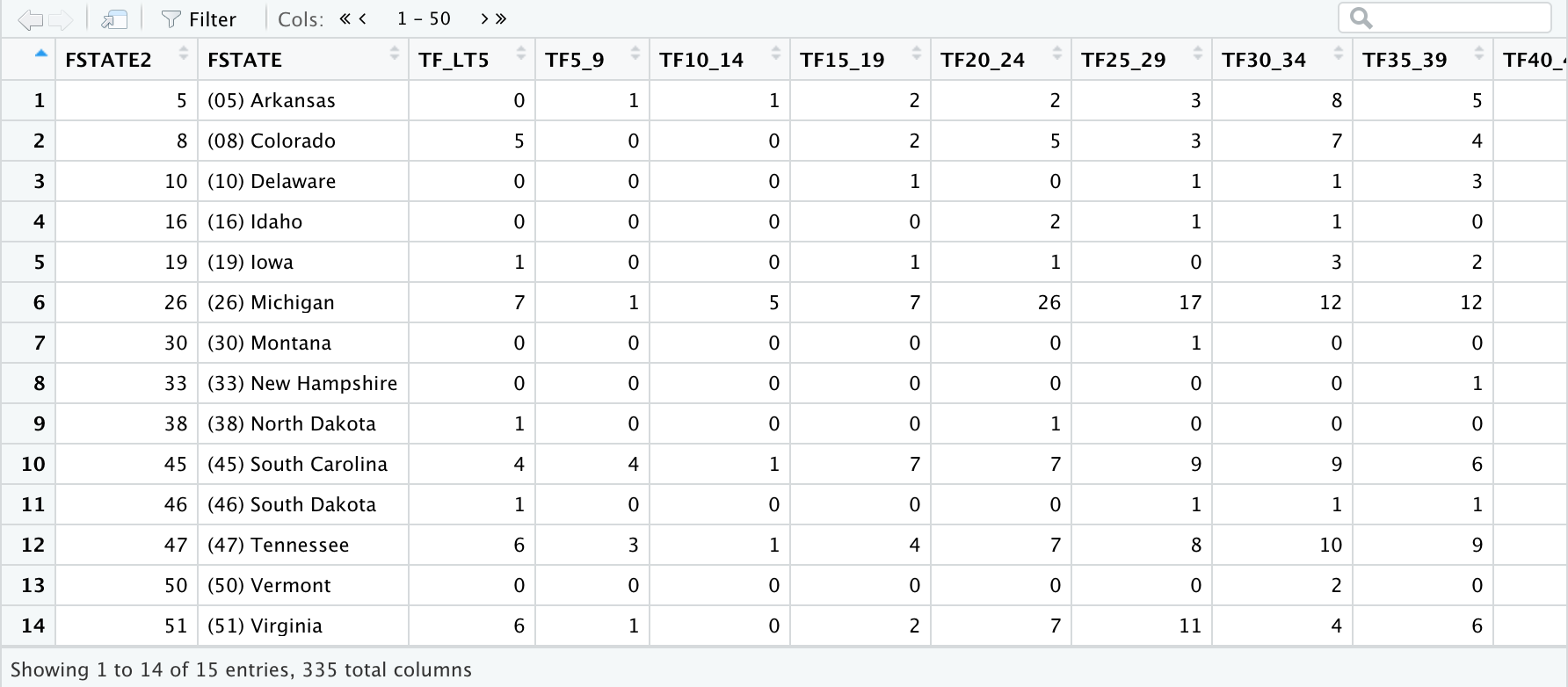
save(victim_counts, file = "victim_counts.rda") We’ve accomplished a lot. The file victim_counts.rda includes the homicide victim counts by sex-age category for each state that reports 100% NIBRS. We have our numerators. We are more than halfway to calculating disaggregated homicide victimization rates. The ACS data are already sex-age categorized, so we won’t have to repeat that work.
Calculate Denominators
We now have all the numerators needed for understanding homicide rates for different age and gender categories in NIBRS states. Now we must get the denominators. Since we want to look at crime rates in different population groups, we will use the Census’ ACS data to get the total number of people in each group. This will be our denominator.
There are a few ways to get Census data (e.g. using IPUMS which is an organization at the University of Minnesota that provides data from government surveys, including the Census), but we will find data using the Census’ data table tool. While the IPUMS gives raw data (or as close to raw as privacy concerns permit), the Census data table tool does some pre-processing for us. In our case that means that the data we retrieve will already be aggregated into the groups we want.
All data decisions in research come with trade-offs. The trade-off here is that our analysis is limited to the groups that the Census decided to provide. For example, whereas IPUMS provides age in years for all respondents (even in days for very young individuals), the Censusprovides age categories. A major benefit of the Census is that it aggregates the data for us. This reduces the amount of work we do ourselves and reduces the number of mistakes we can make. But it does restrict the number of categories of persons we can look at.
Is it important that we know the murder rate for women aged 72, or are we satisfied by the age category of 70-74? Does having more categories increase understanding without unnecessary complexity? The answer depends entirely on the question you are asking. As this guide is focused on using the LEAIC rather than Census data, this trade-off is acceptable to us. Your own research may necessitate more thorough data than the Census currently provides.
When conducting research, always consider the available data and how each data set can affect your research. Limitations in a data set mean limitations in your research. The very questions we can ask change based on the data we are using. Consider the data available and the questions you want to ask carefully before starting your research.
To get the necessary data from the Census data table tool, follow these steps:
- Go to https://data.census.gov/cedsci/
- In the search bar, search for “American Community Survey”
- Choose the first table that appears in the search results: “Age and Sex”
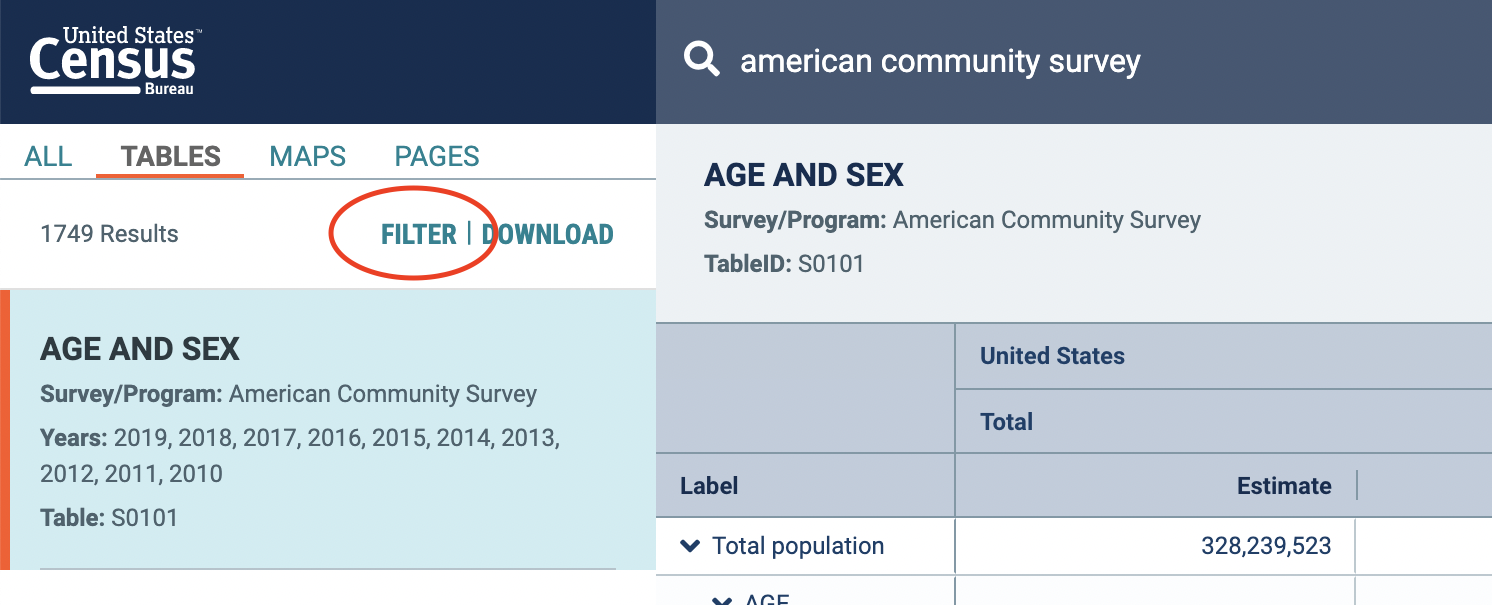
- After you click on the “Age and Sex” table, click the “Filter” button in the top left
- In the filter view, you will need to select the relevant data years and geography. Make sure you enter all of the following into the search bar: american community survey, 2013, Arkansas, Colorado, Delaware, Idaho, Iowa, Michigan, Montana, New Hampshire, North Dakota, South Carolina, South Dakota, Tennessee, Vermont, Virginia, West Virginia. This selection allows us to get only the 2013 data that we are interested in (the same year as our NIBRS data), as well as the 15 states that had 100% of agencies reporting to NIBRS in 2013.
- The 100% NIBRS states in 2013 are Arkansas, Colorado, Delaware, Idaho, Iowa, Michigan, Montana, New Hampshire, North Dakota, South Carolina, South Dakota, Tennessee, Vermont, Virginia, and West Virginia, the states we selected in our filter.
- Click Search.
- Finally, we need to select the data set to get the above variables from. When you are in your table view, you will find a “Product” dropdown in the top right corner. In the dropdown menu, select “2013: ACS 5-Year Estimates Subject Tables”.

- 1-year estimates give data from the survey given that year. 3- and 5-year estimates use data from the selected year and the year before and after (or two years before and after for 5-year estimates). These two data sets have far more information than the 1-year estimate (due to covering more people in their combined surveys) but are less precise for the given year.
- As mentioned above, there are trade-offs with any data set. 1-year estimates only have data from the year in question, so are better able to answer questions about what is going on in that year. However, they do have fewer respondents than 3- or 5-year estimates. None of the data sets are objectively better than another (and this is true with nearly all data sets). You must first understand what information the data have available and determine if it can answer the questions you want to ask.
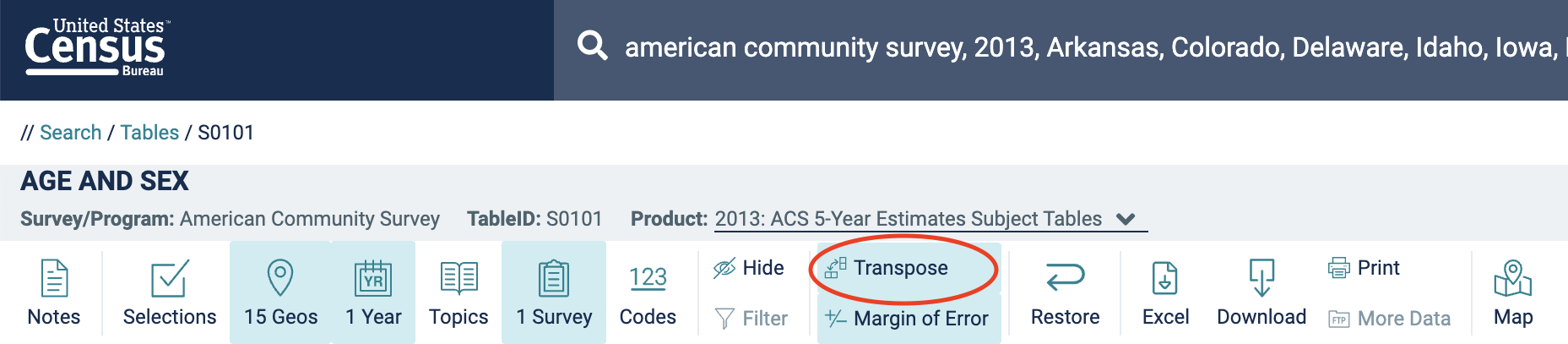
- We are done specifying what data we want. By default, our table has states as columns and age categories as rows. For easier analysis, let’s swap them. Click Customize Table and then Transpose:
- To download the data, click Download, select CSV format, and then uncheck the checkboxes that emerge. Click the Download button to download a zipped file containing the data.
-
- Downloading the data will open a folder with multiple files. The .csv file that you want includes “
ACSST5Y2013.S0101_data_with_overlays” in the title. Move it to your working directory folder.
- Downloading the data will open a folder with multiple files. The .csv file that you want includes “
-
Calculate Rates
Finally, we can combine our numerator and denominator files into one file and calculate disaggregated homicide rates. All records from the victim counts file will be included in the merged file. The ACS fileincludes population data for all states.
After the merge is done we calculate the homicide victimization rates by sex and age-category. The rate calculation is the number of homicide victims by sex and age category multiplied by 100,000 and divided by the number of persons in that sex and age category.
Our last data management task is to save our data. We save two files. One file has both rates and counts, which is useful for verification. The second has just the rates.
# Load the population file
ACS <- read.csv("ACS FILE NAME HERE")

# Remove first row
ACS <- ACS[-c(1),]

ACS$FSTATE2 [ACS$GEO_ID=="0400000US05"] =5
ACS$FSTATE2 [ACS$GEO_ID=="0400000US08"] =8
ACS$FSTATE2 [ACS$GEO_ID=="0400000US10"] =10
ACS$FSTATE2 [ACS$GEO_ID=="0400000US16"] =16
ACS$FSTATE2 [ACS$GEO_ID=="0400000US19"] =19
ACS$FSTATE2 [ACS$GEO_ID=="0400000US26"] =26
ACS$FSTATE2 [ACS$GEO_ID=="0400000US30"] =30
ACS$FSTATE2 [ACS$GEO_ID=="0400000US33"] =33
ACS$FSTATE2 [ACS$GEO_ID=="0400000US38"] =38
ACS$FSTATE2 [ACS$GEO_ID=="0400000US45"] =45
ACS$FSTATE2 [ACS$GEO_ID=="0400000US46"] =46
ACS$FSTATE2 [ACS$GEO_ID=="0400000US47"] =47
ACS$FSTATE2 [ACS$GEO_ID=="0400000US50"] =50
ACS$FSTATE2 [ACS$GEO_ID=="0400000US51"] =51
ACS$FSTATE2 [ACS$GEO_ID=="0400000US54"] =54
ACS$FSTATE2 <- as.numeric(as.character(ACS$FSTATE2))

# Convert all needed variables to numeric
ACS$S0101_C02_001E <- as.numeric(as.character(ACS$S0101_C02_001E))
ACS$S0101_C02_002E <- as.numeric(as.character(ACS$S0101_C02_002E))
ACS$S0101_C02_003E <- as.numeric(as.character(ACS$S0101_C02_003E))
ACS$S0101_C02_004E <- as.numeric(as.character(ACS$S0101_C02_004E))
ACS$S0101_C02_005E <- as.numeric(as.character(ACS$S0101_C02_005E))
ACS$S0101_C02_006E <- as.numeric(as.character(ACS$S0101_C02_006E))
ACS$S0101_C02_007E <- as.numeric(as.character(ACS$S0101_C02_007E))
ACS$S0101_C02_008E <- as.numeric(as.character(ACS$S0101_C02_008E))
ACS$S0101_C02_009E <- as.numeric(as.character(ACS$S0101_C02_009E))
ACS$S0101_C02_010E <- as.numeric(as.character(ACS$S0101_C02_010E))
ACS$S0101_C02_011E <- as.numeric(as.character(ACS$S0101_C02_011E))
ACS$S0101_C02_012E <- as.numeric(as.character(ACS$S0101_C02_012E))
ACS$S0101_C02_013E <- as.numeric(as.character(ACS$S0101_C02_013E))
ACS$S0101_C02_014E <- as.numeric(as.character(ACS$S0101_C02_014E))
ACS$S0101_C02_015E <- as.numeric(as.character(ACS$S0101_C02_015E))
ACS$S0101_C02_016E <- as.numeric(as.character(ACS$S0101_C02_016E))
ACS$S0101_C02_017E <- as.numeric(as.character(ACS$S0101_C02_017E))
ACS$S0101_C02_018E <- as.numeric(as.character(ACS$S0101_C02_018E))
ACS$S0101_C02_019E <- as.numeric(as.character(ACS$S0101_C02_019E))
ACS$S0101_C03_001E <- as.numeric(as.character(ACS$S0101_C03_001E))
ACS$S0101_C03_002E <- as.numeric(as.character(ACS$S0101_C03_002E))
ACS$S0101_C03_003E <- as.numeric(as.character(ACS$S0101_C03_003E))
ACS$S0101_C03_004E <- as.numeric(as.character(ACS$S0101_C03_004E))
ACS$S0101_C03_005E <- as.numeric(as.character(ACS$S0101_C03_005E))
ACS$S0101_C03_006E <- as.numeric(as.character(ACS$S0101_C03_006E))
ACS$S0101_C03_007E <- as.numeric(as.character(ACS$S0101_C03_007E))
ACS$S0101_C03_008E <- as.numeric(as.character(ACS$S0101_C03_008E))
ACS$S0101_C03_009E <- as.numeric(as.character(ACS$S0101_C03_009E))
ACS$S0101_C03_010E <- as.numeric(as.character(ACS$S0101_C03_010E))
ACS$S0101_C03_011E <- as.numeric(as.character(ACS$S0101_C03_011E))
ACS$S0101_C03_012E <- as.numeric(as.character(ACS$S0101_C03_012E))
ACS$S0101_C03_013E <- as.numeric(as.character(ACS$S0101_C03_013E))
ACS$S0101_C03_014E <- as.numeric(as.character(ACS$S0101_C03_014E))
ACS$S0101_C03_015E <- as.numeric(as.character(ACS$S0101_C03_015E))
ACS$S0101_C03_016E <- as.numeric(as.character(ACS$S0101_C03_016E))
ACS$S0101_C03_017E <- as.numeric(as.character(ACS$S0101_C03_017E))
ACS$S0101_C03_018E <- as.numeric(as.character(ACS$S0101_C03_018E))
ACS$S0101_C03_019E <- as.numeric(as.character(ACS$S0101_C03_019E))

# Compute new population count variables from percentages given in ACS
# Example:
#   S0101_C03_002E,    percentage of population of females
#              less than 5 years old per the American Community Survey.
#   S0101_C03_001E,    total population of females per
#              the American Community Survey.
#   POPF_LT5, the population of females less than
#              5 years old

ACS$POPF_LT5 = (ACS$S0101_C03_002E/100)*ACS$S0101_C03_001E
ACS$POPF5_9 = (ACS$S0101_C03_003E/100)*ACS$S0101_C03_001E
ACS$POPF10_14 = (ACS$S0101_C03_004E/100)*ACS$S0101_C03_001E
ACS$POPF15_19 = (ACS$S0101_C03_005E/100)*ACS$S0101_C03_001E
ACS$POPF20_24 = (ACS$S0101_C03_006E/100)*ACS$S0101_C03_001E
ACS$POPF25_29 = (ACS$S0101_C03_007E/100)*ACS$S0101_C03_001E
ACS$POPF30_34 = (ACS$S0101_C03_008E/100)*ACS$S0101_C03_001E
ACS$POPF35_39 = (ACS$S0101_C03_009E/100)*ACS$S0101_C03_001E
ACS$POPF40_44 = (ACS$S0101_C03_010E/100)*ACS$S0101_C03_001E
ACS$POPF45_49 = (ACS$S0101_C03_011E/100)*ACS$S0101_C03_001E
ACS$POPF50_54 = (ACS$S0101_C03_012E/100)*ACS$S0101_C03_001E
ACS$POPF55_59 = (ACS$S0101_C03_013E/100)*ACS$S0101_C03_001E
ACS$POPF60_64 = (ACS$S0101_C03_014E/100)*ACS$S0101_C03_001E
ACS$POPF65_69 = (ACS$S0101_C03_015E/100)*ACS$S0101_C03_001E
ACS$POPF70_74 = (ACS$S0101_C03_016E/100)*ACS$S0101_C03_001E
ACS$POPF75_79 = (ACS$S0101_C03_017E/100)*ACS$S0101_C03_001E
ACS$POPF80_84 = (ACS$S0101_C03_018E/100)*ACS$S0101_C03_001E
ACS$POPF85_OVR = (ACS$S0101_C03_019E/100)*ACS$S0101_C03_001E
ACS$POPM_LT5 = (ACS$S0101_C02_002E/100)*ACS$S0101_C02_001E
ACS$POPM5_9 = (ACS$S0101_C02_003E/100)*ACS$S0101_C02_001E
ACS$POPM10_14 = (ACS$S0101_C02_004E/100)*ACS$S0101_C02_001E
ACS$POPM15_19 = (ACS$S0101_C02_005E/100)*ACS$S0101_C02_001E
ACS$POPM20_24 = (ACS$S0101_C02_006E/100)*ACS$S0101_C02_001E
ACS$POPM25_29 = (ACS$S0101_C02_007E/100)*ACS$S0101_C02_001E
ACS$POPM30_34 = (ACS$S0101_C02_008E/100)*ACS$S0101_C02_001E
ACS$POPM35_39 = (ACS$S0101_C02_009E/100)*ACS$S0101_C02_001E
ACS$POPM40_44 = (ACS$S0101_C02_010E/100)*ACS$S0101_C02_001E
ACS$POPM45_49 = (ACS$S0101_C02_011E/100)*ACS$S0101_C02_001E
ACS$POPM50_54 = (ACS$S0101_C02_012E/100)*ACS$S0101_C02_001E
ACS$POPM55_59 = (ACS$S0101_C02_013E/100)*ACS$S0101_C02_001E
ACS$POPM60_64 = (ACS$S0101_C02_014E/100)*ACS$S0101_C02_001E
ACS$POPM65_69 = (ACS$S0101_C02_015E/100)*ACS$S0101_C02_001E
ACS$POPM70_74 = (ACS$S0101_C02_016E/100)*ACS$S0101_C02_001E
ACS$POPM75_79 = (ACS$S0101_C02_017E/100)*ACS$S0101_C02_001E
ACS$POPM80_84 = (ACS$S0101_C02_018E/100)*ACS$S0101_C02_001E
ACS$POPM85_OVR = (ACS$S0101_C02_019E/100)*ACS$S0101_C02_001E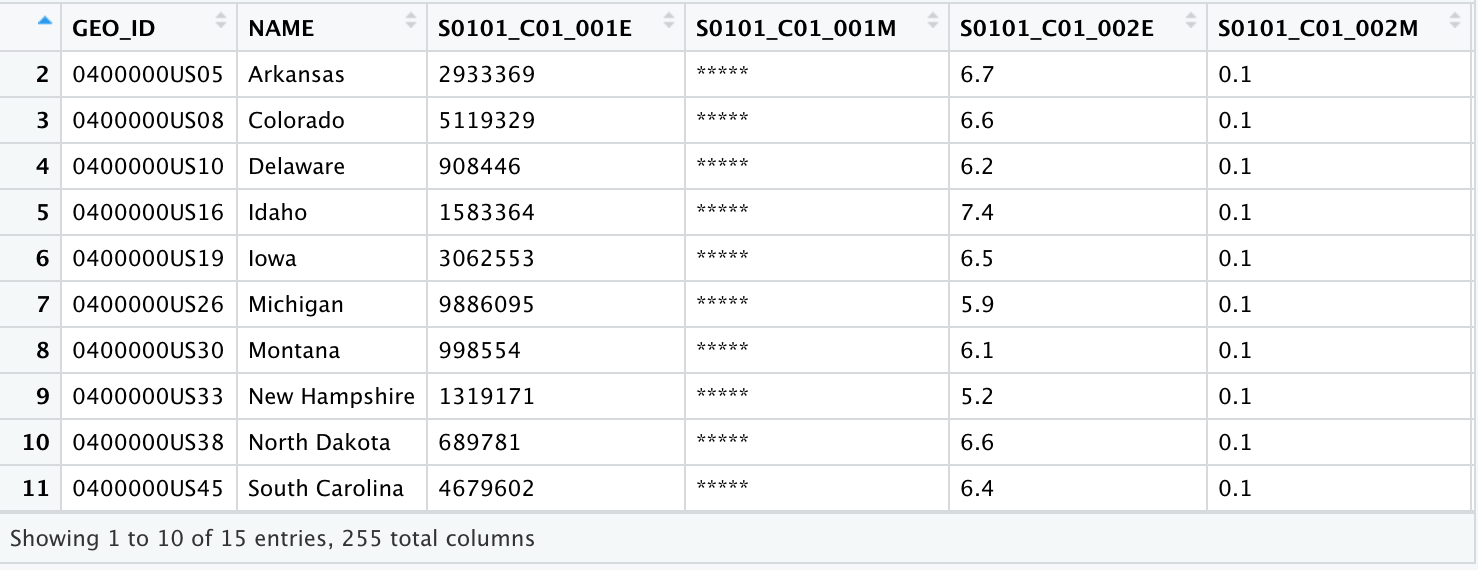
# Combine the ACS population file  with the victim counts file
victim_counts <- merge(victim_counts, ACS,
                       by = "FSTATE2", all.x = TRUE)


# Calculate rates.
# Example:
#  RTF_LT5,   rate of homicide victimization for females
#              less than 5 years old.
#   TF_LT5,    total count of female homicide victims
#              less than 5 years old.
#   POPF_LT5, the population of females less than
#              5 years old.


victim_counts$RTF_LT5		<- 100000 * victim_counts$TF_LT5 /
  victim_counts$POPF_LT5
victim_counts$RTF5_9		<- 100000 * victim_counts$TF5_9 /
  victim_counts$POPF5_9
victim_counts$RTF10_14	<- 100000 * victim_counts$TF10_14 /
  victim_counts$POPF10_14
victim_counts$RTF15_19 	<- 100000 * victim_counts$TF15_19 /
  victim_counts$POPF15_19
victim_counts$RTF20_24 	<- 100000 * victim_counts$TF20_24 /
  victim_counts$POPF20_24
victim_counts$RTF25_29 	<- 100000 * victim_counts$TF25_29 /
  victim_counts$POPF25_29
victim_counts$RTF30_34 	<- 100000 * victim_counts$TF30_34 /
  victim_counts$POPF30_34
victim_counts$RTF35_39 	<- 100000 * victim_counts$TF35_39 /
  victim_counts$POPF35_39
victim_counts$RTF40_44 	<- 100000 * victim_counts$TF40_44 /
  victim_counts$POPF40_44
victim_counts$RTF45_49 	<- 100000 * victim_counts$TF45_49 /
  victim_counts$POPF45_49
victim_counts$RTF50_54 	<- 100000 * victim_counts$TF50_54 /
  victim_counts$POPF50_54
victim_counts$RTF55_59 	<- 100000 * victim_counts$TF55_59 /
  victim_counts$POPF55_59
victim_counts$RTF60_64 	<- 100000 * victim_counts$TF60_64 /
  victim_counts$POPF60_64
victim_counts$RTF65_69 	<- 100000 * victim_counts$TF65_69 /
  victim_counts$POPF65_69
victim_counts$RTF70_74 	<- 100000 * victim_counts$TF70_74 /
  victim_counts$POPF70_74
victim_counts$RTF75_79 	<- 100000 * victim_counts$TF75_79 /
  victim_counts$POPF75_79
victim_counts$RTF80_84 	<- 100000 * victim_counts$TF80_84 /
  victim_counts$POPF80_84
victim_counts$RTF85_OVR 	<- 100000 * victim_counts$TF85_OVR /
  victim_counts$POPF85_OVR
victim_counts$RTM_LT5 	<- 100000 * victim_counts$TM_LT5 /
  victim_counts$POPM_LT5
victim_counts$RTM5_9 		<- 100000 * victim_counts$TM5_9 /
  victim_counts$POPM5_9
victim_counts$RTM10_14 	<- 100000 * victim_counts$TM10_14 /
  victim_counts$POPM10_14
victim_counts$RTM15_19 	<- 100000 * victim_counts$TM15_19 /
  victim_counts$POPM15_19
victim_counts$RTM20_24 	<- 100000 * victim_counts$TM20_24 /
  victim_counts$POPM20_24
victim_counts$RTM25_29 	<- 100000 * victim_counts$TM25_29 /
  victim_counts$POPM25_29
victim_counts$RTM30_34 	<- 100000 * victim_counts$TM30_34 /
  victim_counts$POPM30_34
victim_counts$RTM35_39 	<- 100000 * victim_counts$TM35_39 /
  victim_counts$POPM35_39
victim_counts$RTM40_44 	<- 100000 * victim_counts$TM40_44 /
  victim_counts$POPM40_44
victim_counts$RTM45_49 	<- 100000 * victim_counts$TM45_49 /
  victim_counts$POPM45_49
victim_counts$RTM50_54 	<- 100000 * victim_counts$TM50_54 /
  victim_counts$POPM50_54
victim_counts$RTM55_59 	<- 100000 * victim_counts$TM55_59 /
  victim_counts$POPM55_59
victim_counts$RTM60_64 	<- 100000 * victim_counts$TM60_64 /
  victim_counts$POPM60_64
victim_counts$RTM65_69 	<- 100000 * victim_counts$TM65_69 /
  victim_counts$POPM65_69
victim_counts$RTM70_74 	<- 100000 * victim_counts$TM70_74 /
  victim_counts$POPM70_74
victim_counts$RTM75_79 	<- 100000 * victim_counts$TM75_79 /
  victim_counts$POPM75_79
victim_counts$RTM80_84 	<- 100000 * victim_counts$TM80_84 /
  victim_counts$POPM80_84
victim_counts$RTM85_OVR 	<- 100000 * victim_counts$TM85_OVR /
  victim_counts$POPM85_OVR
victim_counts$RTFEMALE 	<- 100000 * victim_counts$TFEMALE /
  victim_counts$S0101_C03_001E
victim_counts$RTMALE 		<- 100000 * victim_counts$TMALE /
  victim_counts$S0101_C02_001E

victim_counts$ACSVICTIM <- victim_counts$S0101_C03_001E +
                               victim_counts$S0101_C02_001E

victim_counts$RTVICTIMS 	<- 100000 * victim_counts$TVICTIMS /
  victim_counts$ACSVICTIM

# Add descriptive labels to these new columns.
attr(victim_counts$RTF_LT5, "label")	<- "HOMICIDE RATE ESTIMATE
- FEMALE UNDER 5 YEARS"
attr(victim_counts$RTF5_9, "label") 	<- "HOMICIDE RATE ESTIMATE
- FEMALE 5 TO 9 YEARS"
attr(victim_counts$RTF10_14, "label")	<- "HOMICIDE RATE ESTIMATE
- FEMALE 10 TO 14 YEARS"
attr(victim_counts$RTF15_19, "label") 	<- "HOMICIDE RATE ESTIMATE
- FEMALE 15 TO 19 YEARS"
attr(victim_counts$RTF20_24, "label") 	<- "HOMICIDE RATE ESTIMATE
- FEMALE 20 TO 24 YEARS"
attr(victim_counts$RTF25_29, "label")	<- "HOMICIDE RATE ESTIMATE
- FEMALE 25 TO 29 YEARS"
attr(victim_counts$RTF30_34, "label") 	<- "HOMICIDE RATE ESTIMATE
- FEMALE 30 TO 34 YEARS"
attr(victim_counts$RTF35_39, "label")	<- "HOMICIDE RATE ESTIMATE
- FEMALE 35 TO 39 YEARS"
attr(victim_counts$RTF40_44, "label") 	<- "HOMICIDE RATE ESTIMATE
- FEMALE 40 TO 44 YEARS"
attr(victim_counts$RTF45_49, "label") 	<- "HOMICIDE RATE ESTIMATE
- FEMALE 45 TO 49 YEARS"
attr(victim_counts$RTF50_54, "label") 	<- "HOMICIDE RATE ESTIMATE
- FEMALE 50 TO 54 YEARS"
attr(victim_counts$RTF55_59, "label") 	<- "HOMICIDE RATE ESTIMATE
- FEMALE 55 TO 59 YEARS"
attr(victim_counts$RTF60_64, "label") 	<- "HOMICIDE RATE ESTIMATE
- FEMALE 60 TO 64 YEARS"
attr(victim_counts$RTF65_69, "label") 	<- "HOMICIDE RATE ESTIMATE
- FEMALE 65 TO 69 YEARS"
attr(victim_counts$RTF70_74, "label")	<- "HOMICIDE RATE ESTIMATE
- FEMALE 70 TO 74 YEARS"
attr(victim_counts$RTF75_79, "label")	<- "HOMICIDE RATE ESTIMATE
- FEMALE 75 TO 79 YEARS"
attr(victim_counts$RTF80_84, "label") 	<- "HOMICIDE RATE ESTIMATE
- FEMALE 80 TO 84 YEARS"
attr(victim_counts$RTF85_OVR, "label")	<- "HOMICIDE RATE ESTIMATE
- FEMALE 85 YEARS AND OVER"
attr(victim_counts$RTM_LT5, "label") 	<- "HOMICIDE RATE ESTIMATE
- MALE UNDER 5 YEARS"
attr(victim_counts$RTM5_9, "label") 	<- "HOMICIDE RATE ESTIMATE
- MALE 5 TO 9 YEARS"
attr(victim_counts$RTM10_14, "label")	<- "HOMICIDE RATE ESTIMATE
- MALE 10 TO 14 YEARS"
attr(victim_counts$RTM15_19, "label")	<- "HOMICIDE RATE ESTIMATE
- MALE 15 AND 19 YEARS"
attr(victim_counts$RTM20_24, "label") 	<- "HOMICIDE RATE ESTIMATE
- MALE 20 TO 24 YEARS"
attr(victim_counts$RTM25_29, "label") 	<- "HOMICIDE RATE ESTIMATE
- MALE 25 TO 29 YEARS"
attr(victim_counts$RTM30_34, "label") 	<- "HOMICIDE RATE ESTIMATE
- MALE 30 TO 34 YEARS"
attr(victim_counts$RTM35_39, "label")	<- "HOMICIDE RATE ESTIMATE
- MALE 35 TO 39 YEARS"
attr(victim_counts$RTM40_44, "label") 	<- "HOMICIDE RATE ESTIMATE
- MALE 40 TO 44 YEARS"
attr(victim_counts$RTM45_49, "label") 	<- "HOMICIDE RATE ESTIMATE
- MALE 45 TO 49 YEARS"
attr(victim_counts$RTM50_54, "label") 	<- "HOMICIDE RATE ESTIMATE
- MALE 50 TO 54 YEARS"
attr(victim_counts$RTM55_59, "label") 	<- "HOMICIDE RATE ESTIMATE
- MALE 55 TO 59 YEARS"
attr(victim_counts$RTM60_64, "label")	<- "HOMICIDE RATE ESTIMATE
- MALE 60 TO 64 YEARS"
attr(victim_counts$RTM65_69, "label") 	<- "HOMICIDE RATE ESTIMATE
- MALE 65 TO 69 YEARS"
attr(victim_counts$RTM70_74, "label") 	<- "HOMICIDE RATE ESTIMATE
- MALE 70 TO 74 YEARS"
attr(victim_counts$RTM75_79, "label") 	<- "HOMICIDE RATE ESTIMATE
- MALE 75 TO 79 YEARS"
attr(victim_counts$RTM80_84, "label")	<- "HOMICIDE RATE ESTIMATE
- MALE 80 TO 84 YEARS"
attr(victim_counts$RTM85_OVR, "label")	<- "HOMICIDE RATE ESTIMATE
- MALE 85 YEARS AND OVER"
attr(victim_counts$RTFEMALE, "label") 	<- "HOMICIDE RATE ESTIMATE
- FEMALE"
attr(victim_counts$RTMALE, "label") 	<- "HOMICIDE RATE ESTIMATE
- MALE"
attr(victim_counts$RTVICTIMS, "label")	<- "HOMICIDE RATE ESTIMATE
- TOTAL"

#===================================================================
# Save final data
#===================================================================

# Save two files: rates and counts and just rates.
rates_and_counts <- victim_counts[, c("FSTATE2",
                                      "RTVICTIMS",
                                      "TVICTIMS",
                                      "ACSVICTIM",
                                      "RTFEMALE",
                                      "TFEMALE",
                                      "S0101_C03_001E",
                                      "S0101_C02_001E",
                                      "RTMALE",
                                      "TMALE",
                                      "RTF_LT5",		"TF_LT5",	"POPF_LT5",
                                      "RTF5_9",		"TF5_9",		"POPF5_9",
                                      "RTF10_14",		"TF10_14",	"POPF10_14",
                                      "RTF15_19",		"TF15_19",	"POPF15_19",
                                      "RTF20_24",		"TF20_24",	"POPF20_24",
                                      "RTF25_29",		"TF25_29", 	"POPF25_29",
                                      "RTF30_34",		"TF30_34",	"POPF30_35",
                                      "RTF35_39",		"TF35_39", 	"POPF35_39",
                                      "RTF40_44",		"TF40_44", 	"POPF40_44",
                                      "RTF45_49",		"TF45_49", 	"POPF45_49",
                                      "RTF50_54",		"TF50_54", 	"POPF50_54",
                                      "RTF55_59",		"TF55_59", 	"POPF55_59",
                                      "RTF60_64",		"TF60_64", 	"POPF60_64",
                                      "RTF65_69",		"TF65_69", 	"POPF65_69",
                                      "RTF70_74",		"TF70_74", 	"POPF70_74",
                                      "RTF75_79",		"TF75_79", 	"POPF75_79",
                                      "RTF80_84",		"TF80_84", 	"POPF80_84",
                                      "RTF85_OVR",		"TF85_OVR", 	"POPF85_OVR",
                                      "RTM_LT5",		"TM_LT5", 	"POPM_LT5",
                                      "RTM5_9",		"TM5_9", 	"POPM5_9",
                                      "RTM10_14",		"TM10_14", 	"POPM10_14",
                                      "RTM15_19",		"TM15_19", 	"POPM15_19",
                                      "RTM20_24",		"TM20_24", 	"POPM20_24",
                                      "RTM25_29",		"TM25_29", 	"POPM25_29",
                                      "RTM30_34",		"TM30_34", 	"POPM30_34",
                                      "RTM35_39",		"TM35_39", 	"POPM35_39",
                                      "RTM40_44",		"TM40_44", 	"POPM40_44",
                                      "RTM45_49",		"TM45_49", 	"POPM45_49",
                                      "RTM50_54",		"TM50_54", 	"POPM50_54",
                                      "RTM55_59",		"TM55_59", 	"POPM55_59",
                                      "RTM60_64",		"TM60_64", 	"POPM60_64",
                                      "RTM65_69",		"TM65_69", 	"POPM65_69",
                                      "RTM70_74",		"TM70_74", 	"POPM70_74",
                                      "RTM75_79",		"TM75_79", 	"POPM75_79",
                                      "RTM80_84",		"TM80_84", 	"POPM80_84",
                                      "RTM85_OVR",		"TM85_OVR",	"POPM85_OVR")]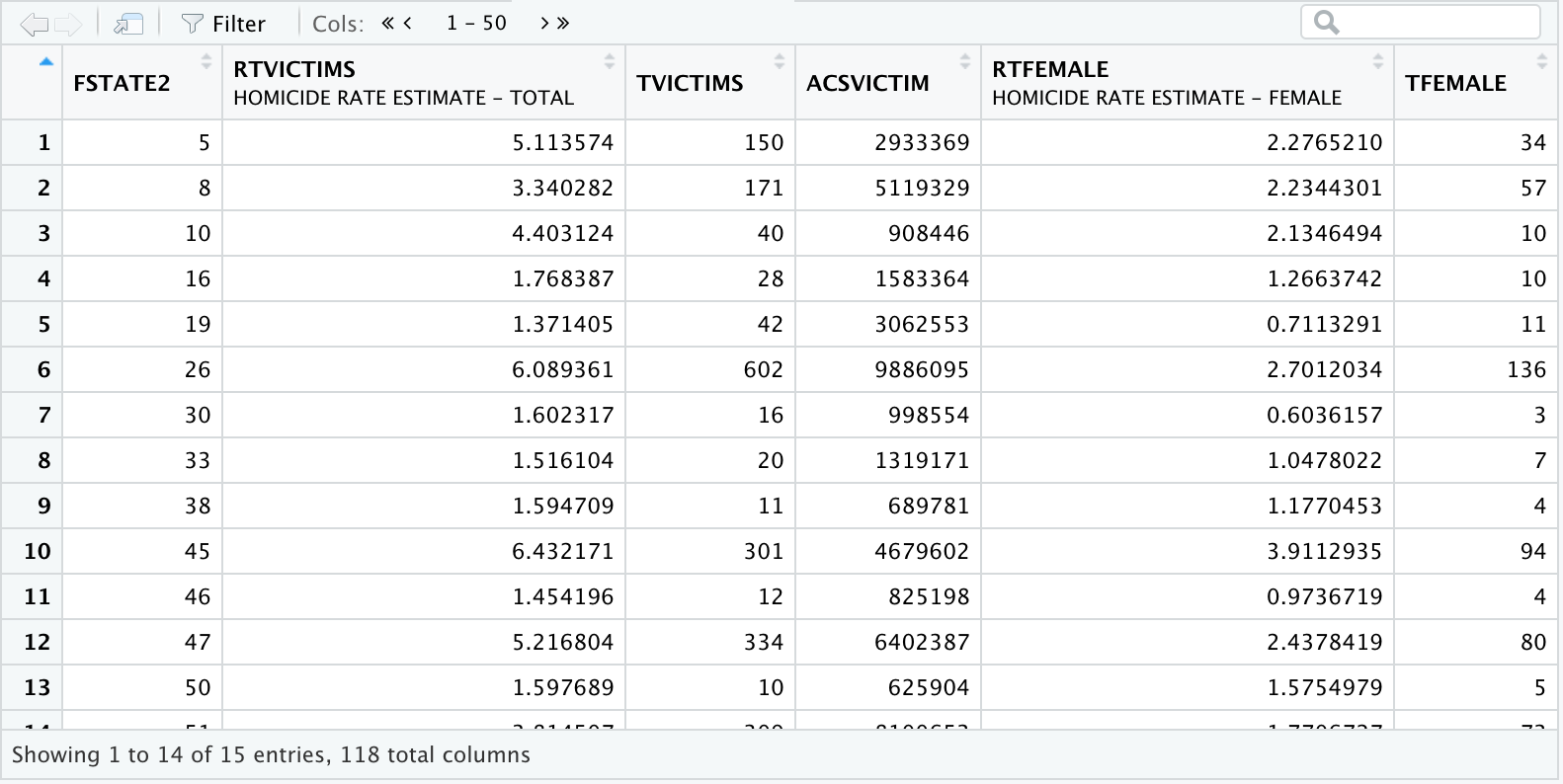
save(rates_and_counts, file = "rates_and_counts.rda")

just_rates <- victim_counts[,
                            c("FSTATE2",
                              "RTVICTIMS",
                              "RTFEMALE",
                              "RTMALE",
                              "RTF_LT5",
                              "RTF5_9",
                              "RTF10_14",
                              "RTF15_19",
                              "RTF20_24",
                              "RTF25_29",
                              "RTF30_34",
                              "RTF35_39",
                              "RTF40_44",
                              "RTF45_49",
                              "RTF50_54",
                              "RTF55_59",
                              "RTF60_64",
                              "RTF65_69",
                              "RTF70_74",
                              "RTF75_79",
                              "RTF80_84",
                              "RTF85_OVR",
                              "RTM_LT5",
                              "RTM5_9",
                              "RTM10_14",
                              "RTM15_19",
                              "RTM20_24",
                              "RTM25_29",
                              "RTM30_34",
                              "RTM35_39",
                              "RTM40_44",
                              "RTM45_49",
                              "RTM50_54",
                              "RTM55_59",
                              "RTM60_64",
                              "RTM65_69",
                              "RTM70_74",
                              "RTM75_79",
                              "RTM80_84",
                              "RTM85_OVR")]
save(just_rates, file = "just_rates.rda")You have now created files with the calculated homicide rates by sex and age category for the states participating 100% in NIBRS for the year 2013. Along the way we have used NIBRS, ACS, and LEAIC data; we’ve created subsets, merged files, computed new variables and aggregated variables; we tested the results of our work at key points; we calculated the disaggregated rates and saved our final files. We are now able to see how different the individual rates are from the overall U.S. rate that we started with.
Examine the Results
If we use the data editor to examine individual values in the file just_rates.rda, we immediately see results that tell us much more than the overall U.S. homicide victimization rate. Total victimization rates by state vary from 1.4 (Iowa) to 6.4 (South Carolina). In each state, the homicide victimization rate for males is higher than for females, except in Vermont, where they are equal. These results are easy to see just by looking at the individual records.
Find the Highest Rates per State
The file just_rates.rda is not large. We could simply read across each row to find the age category with the largest rate in each state. If we did that we would have a list like this:
| STATE | RATE_CATEGORY | RATE |
|---|---|---|
| Arkansas | RTM30_34 | 22.4 |
| Colorado | RTM20_24 | 10.1 |
| Delaware | RTM15_19 | 25.3 |
| Idaho | RTM85_OVR | 10.5 |
| Iowa | RTM20_24 | 7.1 |
| Michigan | RTM25_29 | 25.7 |
| Montana | RTM40_44 | 10.3 |
| New Hampshire | RTM80_84 | 9.6 |
| North Dakota | RTM30_34 | 12.8 |
| South Carolina | RTM20_24 | 21.1 |
| South Dakota | RTM_LT5 | 9.9 |
| Tennessee | RTM25_29 | 22.8 |
| Vermont | RTF70_74 | 17.5 |
| Virginia | RTM20_24 | 15.8 |
| West Virginia | RTM25_29 | 16.7 |
Are the results surprising? For the most part we see relatively young males as victims. But what is going on with Idaho, New Hampshire, and Vermont? In Vermont, Females 70 to 74 years old have the highest homicide victimization rate in the state. Can this be correct? The answer is yes, but it is worth looking into why it is correct.
Vermont is a relatively low population state. Consequently, a single homicide can substantially affect their homicide rate. In addition, since we are looking at disaggregated rates, the denominator we use is small, which magnifies the effect. Looking at the file we just created –rates_and_counts.rda – we see that the population of females aged 70 to 74 in Vermont is only 11,425 (POPF70_74), and there are two female victims of homicide in this age group. The rate of 17.5 (RTF70_74) is simply ( 2 * 100,000 ) /11,425. The rate is correct, but we should be careful given how sensitive it is to change. One less homicide cuts the rate in half, and one more increases it by 50%.
Wrap Up
Congratulations! You have learned how to use the LEAIC file to link diverse data sources in order to calculate homicide victimization rates. We’ve covered a lot of topics, and hopefully we’ve shown that using the LEAIC is not too difficult and opens up a world of research possibilities. NIBRS is the format of future FBI crime data, but it only gives the numerator for crime rate calculations; Census data is a great source for denominators. The LEAIC file brings them together.