Understanding ICPSR Search Filters and Badges
Filters are found on the left side of the search results page and enable you to personalize your search results by isolated key criteria. Below we provide definitions such that you can interpret how the filters may impact your results. Badges are found at the top of each study in your search results. Using these tools, you can narrow down your search results and identify the studies you need.*
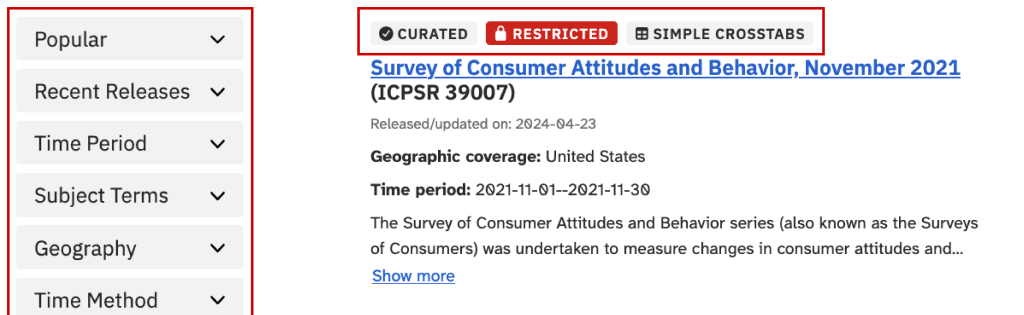
Popular Filters
- openICPSR Studies
Selecting this filter restricts results to replication data and other self-published studies that were previously found on openICPSR. Includes content from repositories as well as individually self-published content. Some data and documentation have undergone a review by journal staff but these content have not been curated or checked by ICPSR staff for accuracy or completeness. Use this filter if you want researcher-uploaded data, but understand it may not be reviewed by ICPSR. - Curated
Selecting this filter restricts results to studies that have been reviewed by ICPSR. Professional curators have described, checked, and documented data to facilitate findability and reuse. Most curated studies have files formatted for common statistical packages. Read more about the difference between curated and self-published studies. Use this filter if you want data that ICPSR staff have reviewed. - Exclude Restricted Use
Selecting this filter excludes studies where all data in the study are restricted-use and require an application process that includes obtaining institutional signatures and IRB approval or exemption. Use this filter if you need data you can access quickly. - Online Analysis Available
This filter restricts results to studies where analysis of the data can be performed online (no download needed). The SDA online analysis tool can be used to manipulate variables, perform basic and advanced analyses, or subset the data without requiring users to know or access additional statistical software. Use this filter if you do not know R, Stata, SPSS, or SAS.
Recent Releases
Data that have been added to the ICPSR catalog most recently.
Time Period
The year(s) to which data refer, regardless of when they were collected.
Subject Area (Coming soon!)
A collection of studies organized around a limited number of common, broad topic areas that are widely represented within ICPSR’s data holdings, like “education” or “public opinion.”
Subject Terms
A short word or phase that describes what the study is about and summarizes its content in order to increase its findability. Subject Terms come from the ICPSR Subject Thesaurus and are more specific than subject areas, like “marriage” or “mental health.”
Geography
The location to which data refer or are related.
Time Method
The methods used to collect data over time, like snapshots at one point (cross-sectional) or repeatedly (longitudinal) to study changes or trends.
Thematic Collection
A collection of data that is focused on a specific research topic or field of study or type of data. It is often, though not always, funded by an external organization such as a federal agency, a foundation, or a journal.
Group (Coming soon!)
A flexible collection of studies that share a key characteristic or connection, such as a shared data producer, format, purpose, method, or project.
Series
A collection of related datasets gathered as part of an ongoing research project, longitudinal study, or repeated data collection.
Data Availability
Indicates whether data are available to anyone (public) -or- freely available to those at ICPSR member institutions but with a fee to others.
Investigator Affiliation
Institutional affiliation of the investigator(s) at the time that they collected and/or deposited the data.
Investigator
The individual or organization that was significantly responsible for the design and execution of the study.
Funding Sources
The sources of funding that supported the data collection and/or curation and sharing of the data.
Curated
ICPSR curators document, format, and check data to facilitate findability and reuse. These data and documents have been reviewed.*
Self-published
Researchers publish their data, documentation, and metadata without the assistance of ICPSR staff curators. The content has not been reviewed by ICPSR.*
Restricted
A study contains at least one data file that, due to sensitivity and/or confidentiality concerns, requires an application to access.
Simple Crosstabs
Explore combinations of variables in datasets within these studies prior to downloading using a tool that runs unweighted crosstabulation (contingency) tables, allowing for controls. Good for evaluating whether there are enough respondents in key groups to support intended analyses.
External Data
These data are available from an external resource. ICPSR doesn’t archive or store these data for download.
*Learn about the difference between curated and self-published studies.
Learn More
Check out how to narrow down your results on the Find and Use Data page and How to Find a Dataset in our Teaching & Learning section.